Want to calculate Azure costs accurately and avoid surprise bills? You’re not alone. With Microsoft Azure’s vast array of services, tracking expenses can feel overwhelming—unless you know the right tools and strategies. Let’s break it down simply and powerfully.





Why You Need to Calculate Azure Costs Strategically

Understanding your cloud expenditure isn’t just about budgeting—it’s about control, optimization, and long-term savings. Microsoft Azure offers over 200 services, from virtual machines to AI tools, each with different pricing models. Without a clear method to calculate Azure costs, organizations risk overspending by 30% or more due to idle resources or misconfigured deployments.
The Hidden Risks of Ignoring Azure Cost Management
Many businesses assume their cloud costs are under control until they receive a bill that’s double their forecast. This often happens because of:
- Unmonitored dev/test environments left running 24/7
- Over-provisioned virtual machines (VMs) that exceed actual workload needs
- Data transfer and egress fees that accumulate silently
“The biggest cost in the cloud isn’t the service—it’s the lack of visibility.” — Cloud Economics Expert, 2023
Without actively calculating Azure costs, companies lose not only money but also agility. Financial unpredictability hampers innovation and makes capacity planning nearly impossible.
How Accurate Cost Calculation Drives Business Value
When you can precisely calculate Azure costs, you gain the power to:
- Allocate budgets per department, project, or team using tags
- Identify underutilized resources and right-size them
- Negotiate better reserved instance discounts
- Demonstrate ROI on cloud investments to stakeholders
For example, a mid-sized SaaS company reduced its monthly Azure bill by 42% in six months simply by implementing cost tagging and shutting down unused resources—proving that visibility equals value.
Key Components That Influence Azure Pricing
To effectively calculate Azure costs, you must first understand the building blocks of Azure’s pricing model. Unlike traditional on-premises IT, where costs are largely fixed, Azure operates on a pay-as-you-go (PAYG) structure with variable and sometimes hidden charges.
Compute: The Heart of Your Azure Bill
Compute resources—like Virtual Machines, Azure Kubernetes Service (AKS), and Azure Functions—are often the largest cost drivers. VMs are priced based on:
- Instance size (vCPUs, RAM, storage)
- Region (e.g., East US vs. West Europe)
- Operating system (Windows licenses cost more than Linux)
- Uptime (per-second billing after the first minute)
For example, an Azure D4s v3 VM in East US costs approximately $0.192/hour on PAYG. Running it 24/7 for a month totals about $138. But if you use a 1-year reserved instance, that drops to ~$83—a 40% saving.
Storage: More Than Just Disk Space
Azure storage pricing includes several layers:
- Storage type (Standard HDD, Premium SSD, Ultra Disk)
- Redundancy (LRS, ZRS, GRS)
- Data access frequency (hot, cool, archive tiers)
- Operations (read/write transactions)
Storing 1 TB of data in Standard HDD with LRS redundancy in East US costs $20.40/month. But if you move infrequently accessed data to the Archive tier, that drops to $2.50/month—massive savings for cold data.
calculate azure costs – Calculate azure costs menjadi aspek penting yang dibahas di sini.
Networking and Data Transfer: The Silent Cost Creep
Many teams overlook networking costs when they calculate Azure costs. Key charges include:
- Inbound data: Free
- Outbound data: Tiered pricing (first 5 GB free, then $0.08/GB up to 10 TB)
- Bandwidth between regions: $0.01–$0.10/GB depending on distance
- Load balancers and Application Gateways: Hourly + data processing fees
A media company once discovered that 60% of its Azure bill came from egress fees due to global content delivery—highlighting why you must monitor data flow as closely as compute.
Tools to Calculate Azure Costs Accurately
Microsoft provides several native tools to help you calculate Azure costs, each serving a different purpose in the cost management lifecycle.
Azure Pricing Calculator: Plan Before You Deploy
The Azure Pricing Calculator is your first stop when estimating costs. It allows you to:
- Select services (VMs, databases, CDN, etc.)
- Configure specs (size, region, redundancy)
- Estimate monthly costs based on usage patterns
- Save and share scenarios with your team
While it doesn’t pull real-time usage data, it’s invaluable for forecasting and comparing architecture options before deployment.
Azure Cost Management + Billing: Real-Time Insights
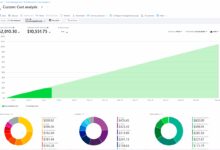
This is the most powerful tool to calculate Azure costs post-deployment. Integrated into the Azure portal, it offers:
- Detailed cost analysis by service, resource group, or tag
- Daily and monthly spending trends
- Budget alerts and forecasting (predicts spend up to 30 days ahead)
- Export reports to CSV or connect to Power BI
You can set a budget of $5,000/month and receive alerts at 75%, 90%, and 100%. This proactive monitoring prevents bill shock and enables rapid response to anomalies.
Third-Party Tools: Enhanced Visibility and Optimization
While Azure’s native tools are robust, third-party platforms like CloudHealth by VMware or Datadog offer deeper analytics, multi-cloud support, and AI-driven recommendations.
- Automated rightsizing suggestions
- Carbon footprint tracking
- Custom dashboards for finance and engineering teams
For enterprises managing hybrid or multi-cloud environments, these tools provide a unified view that Azure alone cannot offer.
Best Practices to Calculate Azure Costs Effectively
Knowing the tools is half the battle. The other half is applying best practices that turn cost data into actionable insights.
Use Resource Tagging for Granular Cost Allocation
Tags are key-value pairs (e.g., Project: CRM, Environment: Production, Owner: DevTeam-East) that let you categorize resources.
calculate azure costs – Calculate azure costs menjadi aspek penting yang dibahas di sini.
- Tag all resources during deployment (enforce via Azure Policy)
- Use tags in Cost Management to filter spending by department, project, or cost center
- Generate chargeback reports for internal billing
One financial services firm used tagging to allocate $1.2M in monthly cloud costs across 15 teams—enabling accountability and better budgeting.
Leverage Reserved Instances and Savings Plans
If you have predictable workloads, Reserved Virtual Machine Instances (RIs) can save up to 72% compared to PAYG.
- 1-year reservation: ~40% discount
- 3-year reservation: ~72% discount
- Flexible: Can exchange or cancel RIs for credit
Azure also offers Savings Plans for compute usage, providing a consistent hourly rate across VMs and AKS, simplifying cost predictability.
Monitor and Optimize Continuously
Cost optimization isn’t a one-time task. It requires ongoing monitoring:
- Run weekly cost reviews with your cloud team
- Use Azure Advisor for optimization recommendations (e.g., “Downsize VM to D2s v3”)
- Automate shutdown of non-production resources after hours
Automation tools like Azure Automation or Logic Apps can turn off dev environments at 7 PM and restart them at 8 AM—cutting compute costs by up to 70%.
Common Mistakes When Trying to Calculate Azure Costs
Even experienced teams make errors that inflate their Azure bills. Avoid these pitfalls to maintain financial control.
Ignoring Idle or Orphaned Resources
Resources like unattached disks, unused public IPs, or abandoned VMs continue to incur charges.
- An unattached 1 TB Premium SSD disk costs ~$140/month
- A single public IP with a standard SKU costs $30/month if not attached
- Use Azure Advisor to detect “idle VMs” and “unattached disks”
One healthcare provider found $220,000 in annual waste from orphaned resources—equivalent to 18% of their cloud budget.
Overlooking Egress and Cross-Region Data Transfer
Data movement costs are often underestimated. For example:
- Transferring 10 TB from East US to Asia Pacific: ~$800/month
- Delivering 50 TB of video content globally: ~$4,000/month in egress fees
- Using Azure CDN can reduce this by up to 60%
Always model data flow in your cost calculations—especially for global applications.
Failing to Use Azure Hybrid Benefit
If you have existing Windows Server or SQL Server licenses with Software Assurance, you can save up to 55% by using Azure Hybrid Benefit (AHB).
calculate azure costs – Calculate azure costs menjadi aspek penting yang dibahas di sini.
- Windows VM: Reduce hourly cost by applying AHB
- SQL Server: Save up to $16,000/year per core
- Enable AHB directly in the VM configuration
This is a no-cost optimization—yet many organizations forget to activate it.
Advanced Strategies to Optimize Azure Spending
Once you’ve mastered the basics of how to calculate Azure costs, it’s time to level up with advanced financial engineering.
Implement FinOps: The Culture of Cloud Cost Ownership
FinOps (Finance + Operations) is a growing discipline that brings financial accountability to cloud spending.
- Establish a FinOps team with members from finance, engineering, and DevOps
- Use tools like FinOps Foundation’s framework to standardize practices
- Run monthly “cloud cost review” meetings with real-time dashboards
Companies with mature FinOps practices report 25–35% lower cloud costs and faster decision-making.
Use Spot VMs for Fault-Tolerant Workloads
Spot VMs offer up to 90% discount on unused Azure capacity—but can be reclaimed with 30 seconds’ notice.
- Ideal for batch processing, CI/CD pipelines, and rendering farms
- Combine with autoscaling to maintain availability
- Set max price to avoid unexpected spikes
A gaming studio cut its rendering costs from $12,000 to $1,500/month using Spot VMs—proving that risk-tolerant workloads can yield massive savings.
Adopt Serverless and Auto-Scaling Architectures
Services like Azure Functions, Logic Apps, and Cosmos DB charge only for execution time or requests.
- Azure Function: $0.20 per million executions + compute time
- No cost when idle—unlike always-on VMs
- Auto-scale handles traffic spikes without over-provisioning
One e-commerce platform reduced backend costs by 60% by replacing VMs with serverless functions during Black Friday traffic surges.
Future-Proofing Your Azure Cost Strategy
The cloud is evolving rapidly, and so should your approach to calculate Azure costs. Staying ahead requires foresight and adaptability.
Prepare for Price Changes and New Services
Azure updates pricing regularly. For example, in 2023, Microsoft reduced costs for several VM series by up to 10%. Stay informed by:
- Subscribing to Azure Updates blog
- Using Azure Cost Management’s “Price Sheet” API
- Running quarterly cost model reviews
Future services like AI inference pricing or quantum computing will introduce new cost dimensions—early adopters who model these now will have a competitive edge.
calculate azure costs – Calculate azure costs menjadi aspek penting yang dibahas di sini.
Integrate AI-Powered Cost Forecasting
Microsoft is integrating AI into Azure Cost Management to predict anomalies and recommend actions.
- AI detects unusual spending patterns (e.g., sudden spike in Blob storage)
- Recommends rightsizing based on CPU/memory usage history
- Forecasts next month’s bill with 90%+ accuracy
By 2025, Gartner predicts that 60% of enterprises will use AI-driven cloud financial management tools—don’t get left behind.
How do I start calculating my current Azure costs?
Log in to the Azure portal, navigate to Cost Management + Billing, and select “Cost Analysis.” Filter by subscription, resource group, or tag to see detailed spending. Export data for deeper analysis or set up a budget to monitor usage in real time.
What’s the easiest way to reduce my Azure bill?
Start by shutting down unused resources, applying Azure Hybrid Benefit, and using the Azure Pricing Calculator to identify over-provisioned VMs. Then, implement tagging and set up budget alerts to maintain control.
Are reserved instances worth it for my business?
Yes, if you have steady, predictable workloads running for at least one year. Reserved Instances offer up to 72% savings. Use Azure’s “Reserved Instance Recommendations” in Cost Management to see potential savings before purchasing.
Can I calculate costs across multiple Azure subscriptions?
Absolutely. Azure Cost Management supports management groups, allowing you to aggregate and analyze costs across multiple subscriptions and departments in a single view.
How accurate is the Azure Pricing Calculator?
calculate azure costs – Calculate azure costs menjadi aspek penting yang dibahas di sini.
The Azure Pricing Calculator is highly accurate for estimating known usage patterns. However, it doesn’t account for real-time variables like traffic spikes or data egress. Use it for planning, but always validate with actual Cost Management data post-deployment.
Calculating Azure costs isn’t just a finance task—it’s a strategic imperative. By leveraging the right tools, adopting best practices like tagging and reservations, and avoiding common pitfalls, you can gain full visibility and control over your cloud spending. Whether you’re a startup or an enterprise, mastering how to calculate Azure costs empowers you to innovate faster, reduce waste, and maximize ROI. The cloud is powerful, but only when you’re in control of its cost.
Recommended for you 👇
Further Reading: